Find the holes attackers use to take over Active Directory
Insight Recon runs 155+ read-only checks against your AD and rates every finding within the context of your domain. You'll know what to fix first and how to fix it.
- See how attackers would abuse each finding and how to fix it
- Start with Quick Wins and your Top 10 riskiest findings
- Free for one domain, with no credit card or Domain Admin needed
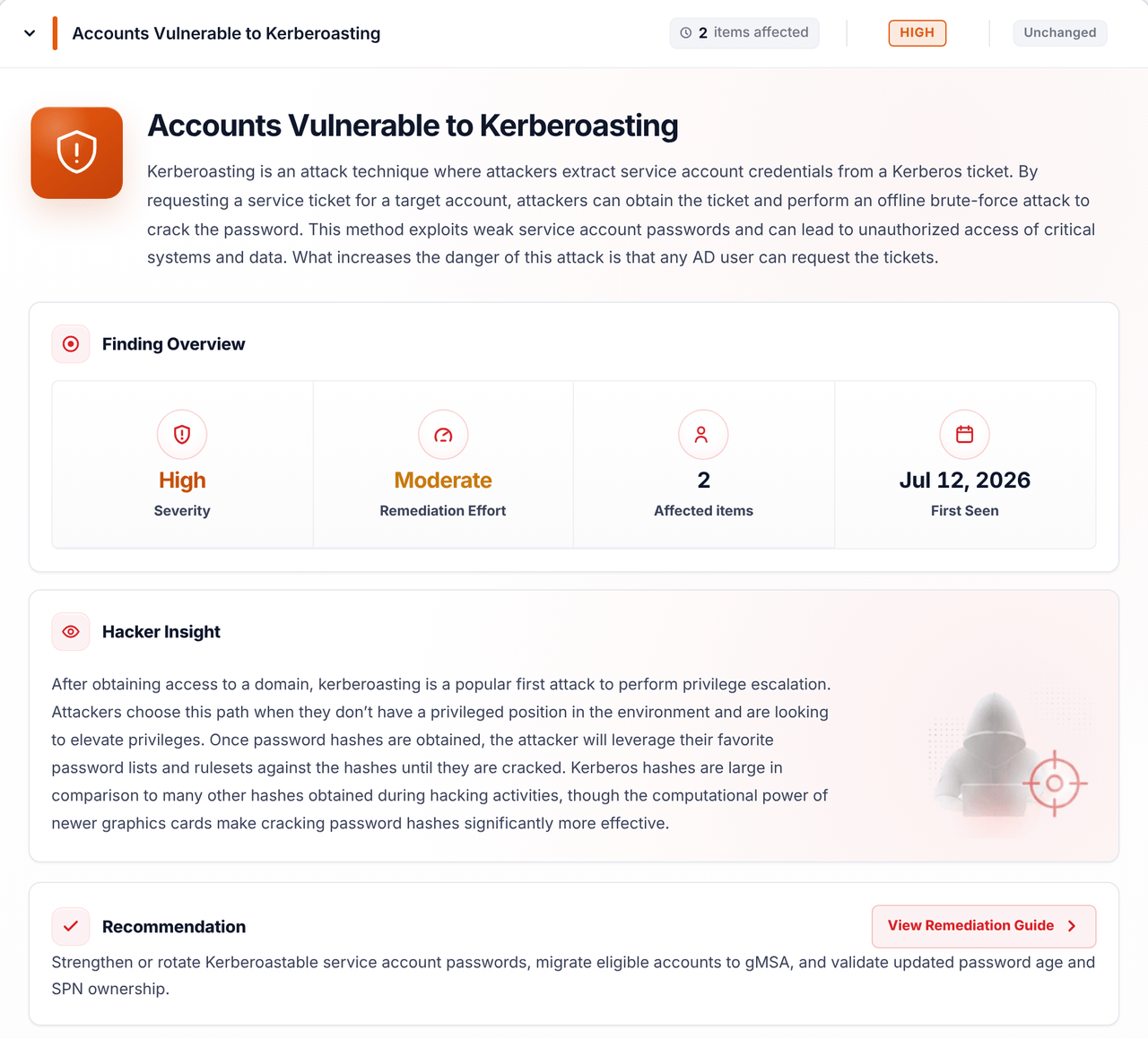
After obtaining access to a domain, kerberoasting is a popular first attack to perform privilege escalation.
Strengthen or rotate Kerberoastable service account passwords and migrate eligible accounts to gMSA.
Used by teams at


Built by penetration testers at Breach Point in Richmond, Virginia
Heath Adams is an Army Reserve veteran who founded TCM Security and created the PNPT, a hands-on pentest certification.
Brad Thornton is a career pentester and red team lead who started with nearly six years in enterprise identity at GE.


We wanted more help with remediation than existing tools gave us
The tools we ran were good at finding problems, but lacked remediation guidance. We wanted more help deciding what to fix first and proving each fix worked, so we built Insight Recon around that.
Severity that makes sense for your domain
Before the scanner picks a severity, it looks at what the finding touches. Kerberos pre-auth turned off on a disabled account is Low, because a DC won't authenticate that account anyway. The same setting on an enabled Domain Admin is Critical and goes straight to the top of your report.
Same with krbtgt. If it hasn't been rotated in six months and a day, we're not going to slap a critical on you. The longer you leave it, the higher it climbs.
- Every flagged account is disabledA DC won't authenticate themLow
- One is an enabled Domain AdminAnyone can request a reply and crack it offlineCritical
- Six months and a day oldWe flag it without calling it criticalNot critical
- Last set 465 days agoFrom the sample reportHigh
You'll know what to fix first
Every report opens with Quick Wins and the Top 10 Riskiest. Quick Wins are the fixes that do the most for the least work. The Top 10 is your riskiest findings in order. Both come with the free plan.
On paid plans every account also gets a risk score built from the severity of its findings and its privilege chain. Sort by risk and you know which accounts to lock down first.
- User-controlled certificate template subject (ESC1)Critical
- DCShadow ActivityCritical
- Dangerous Control Over Privileged ObjectsCritical
- PrivUserWithEmailDomain AdminsTier 0 · 8 findings49.2Critical
- WrongPrimaryUserPrint OperatorsDirect privileged · 7 findings33.3High
A full snapshot of your domain in one place
The report doubles as an inventory. You get every account with its last logon and password age, plus your computers, DCs and who's in your privileged groups. Certificate templates, GPOs and your Entra Connect setup are in there too.
Every table exports to CSV, so the next time someone asks how many stale computers you have, you've already got the answer.
- Domain controllers
- 32 online
- User accounts
- 7512 privileged
- Computers
- 2016 stale
- Last AD backup
- 376days ago
- krbtgt password
- 465days old
- Entra Connect account
- 300days since password set
Every finding comes with the fix
Hacker Insight tells you what an attacker would have to say about the finding, so you know why it matters. Then you get what to check before you touch anything, multiple remediation pathways through scripting and graphical steps.
Single use and bulk scripts that run with precaution code. Each finding finishes with how to confirm the fix worked and the evidence your auditor will want.
See the fix for that Kerberoasting finding
$Accounts = Import-Csv -Path ".\ApprovedServiceAccounts.csv"foreach ($Account in $Accounts) { $NewPassword = Read-Host -AsSecureString "New password for $($Account.SamAccountName)" Set-ADAccountPassword -Identity $Account.SamAccountName -Reset -NewPassword $NewPassword -WhatIf}# Remove -WhatIf after the change has been reviewed and approved.Get-ADUser -Identity <account> -Properties PasswordLastSet- Verify the dependent service is running and authenticating successfully.
- Run Insight Recon AD against the same scope to confirm the finding is resolved.
Track every fix until a scan confirms it
On paid plans each finding gets an owner, a status and a due date from your SLA targets. Comments and the ticket number from your own ticketing system can stay with the finding.
When someone marks a fix done, the next scan checks it. A clean scan moves it to Verified fixed. If the finding comes back later, it reopens and its SLA clock starts over.
- One queue for everything, across all your domains
- Role-based access for engineers who should only touch what's assigned to them
- Assignment emails and weekly digests so owners know what's due
- A simple remediation status section in every report
- Status
- Verified fixed
- Owner
- AD admin
- Due
- Day 16 · SLA
- Ticket
- SEC-1042
- OpenSecurity lead assigned it to the AD admin. The Critical SLA made it due in 15 days.Day 1
- In progressAD admin added SEC-1042 and a note about pulling svc-backup's replication rights in Thursday's change window.Day 4
- Awaiting verificationAD admin marked it fixed. It waits for the next scan instead of closing on their say-so.Day 5
- Verified fixedThe scheduled scan came back clean a week inside the SLA.Day 9
- RegressedIf a later scan finds those rights again, the finding comes back as Regressed with a fresh SLA.Day 15
The remediation guidance is legit. I clicked into a few of the critical findings… and it walked me through exactly what to change, why an attacker cares, how to verify the fix afterward, and where to go read more.
Brian Johnson, host of the 7 Minute Security podcast Read his review
155+ checks across the parts of AD attackers go after
Each check is there because an attacker would use it or a defender needs to know about it. We don't add checks just to grow the count.
of the scans in our October AD Signal report had at least one critical finding. The report covers 194 anonymized scans from users who opted in. How we counted →
Accounts and passwords
Kerberoasting, AS-REP roasting, stale passwords and accounts that don't need one.
Privileged access
Admin takeover paths and who can pull every hash with DCSync.
Certificate services
ESC1 through ESC17 except ESC12, plus trusted roots and weak certificate crypto.
Kerberos and delegation
Delegation of every kind and how old your krbtgt password is.
Group Policy
Who can edit your GPOs and what the settings hand an attacker.
Domains and trusts
Trust settings, SID filtering and trusts nobody uses anymore.
Configuration and hygiene
SMBv1, Print Spooler on DCs, LAPS coverage and legacy protocols.
Hybrid identity
What Entra Connect leaves in AD, like the sync account.
Run your first scan in a few minutes
Create a free account
It's easy and only takes about a minute.
Download the scanner
It's portable. Nothing gets installed on your domain controllers.
Run it as a standard user
Any Windows machine that can reach your DCs will do. It doesn't even have to be domain-joined.
Read your report
Most scans finish in a few minutes.
What leaves your network
How we handle your data →Trust Center ↗AD metadata, meaning the objects and settings the checks look at.
Password hashes and Kerberos tickets never leave your network. Neither does your NTDS.dit file.
Microsoft Azure, encrypted in transit and at rest. You can export or delete it any time. Close your account and it's gone within 30 days.
SOC 2 Type II. Ask us for the report.
An air-gapped install runs the whole app inside your network. See how it works or ask us about it.
Free gets you every core AD finding
Find what's wrong in one domain and fix it.
- Every core AD finding in full, with no cap
- Hacker Insight and the fix for each one
- Quick Wins and the Top 10
- Risk Posture Score and the executive summary
- One domain, with your latest scan kept
Lower rates past 1,000 accounts. $3,000 minimum. What counts as an account?
For teams keeping every domain they own clean over time.
What Standard adds
- Everything in Free, across every domain and forest you own
- Hybrid identity checks on what Entra Connect leaves in AD
- Remediation tracking with scan-verified fixes
- Account risk scores with each account's privilege chain
- Scheduled scans, history and new-finding alerts
- 5 users, plus free view-only users and Remediators
Or our MSSP plan for clients you look after all year.
For consultants, MSSPs and pentest firms doing client work.
What partners get
- One-off assessments of any size with 60 days of scans
- Year-round clients with every domain they own included
- Rights to use it on client work
- White-label reports and client logins
- Remediation tracking your clients can see
Enterprise is Standard's price plus 20%, so it starts at $12 per account a year with a $15,000 minimum and unlimited users. SSO and IP allowlisting are included. Enterprise and the partner plans can add integrations and installs on your own servers.
Before you ask
Do I need Domain Admin to run it?
No. A standard domain user on any Windows machine that can reach your DCs is all it needs.
Will the scan change anything or set off alerts?
It won't change anything. The scan is read-only.
It might set off alerts. It reads a lot of AD in a short time and some security tools flag that as reconnaissance. Give whoever watches your alerts a heads-up before you run it.
How is it different from PingCastle or Purple Knight?
Both are solid tools and both give you remediation steps. We rate every finding by what it touches in your domain, so the top of your report is what matters to you. You also get the Top 10, account risk scores on paid plans and a way to prove each fix worked. Our comparisons go through the details.
Can I run it on a client's domain?
Not on Free or Standard. Client work needs a partner plan and written authorization from each client. An Auditor assessment is $350 and covers one client domain for 60 days. Year-round client work goes on MSSP, which has its own partner rate card. See partner pricing.
Got another question? Email our team.
Go see what's hiding in your domain
Free for one domain with no sales call. You can still book a demo any time.