
Active Directory Security Benchmark – September 2026 Signal
Active Directory Signal · September 2026
Real data from real Active Directory environments.
Active Directory security benchmarks based on anonymized scan data from real environments, showing what organizations are actually exposed to in practice.
The data in this report comes from 173 anonymized Active Directory scan results, voluntarily shared by Insight Recon users. Together, they form an Active Directory security benchmark for understanding how real environments are configured and secured. This month's data points to a familiar pattern: environments aren't failing on obscure edge cases, they're carrying the same handful of high-prevalence weaknesses, and most of them are easily remediated.
Executive snapshot
The average environment carries 40 findings, yet nearly half qualify as easy wins. This means most organizations are sitting on more low-effort risks than they realize.
Key takeaway. There are enough easy wins in the average environment that it demonstrates most organizations are unaware of baseline security controls and settings.
Findings, by the numbers
Averaged and median findings per environment, before any remediation.
| Metric | Value |
|---|---|
| Average findings | 39.7 |
| Median findings | 40.4 |
| Average critical-severity findings | 3.0 |
| Average high-severity findings | 14.8 |
Severity mix
The average environment had over 14 High findings and 3 Critical findings before remediation began. High-severity findings dominate the typical environment far more than Critical ones do, which is exactly where the easy wins tend to live.
Finding snapshot
These findings appeared consistently across the environments analyzed, revealing recurring weaknesses in privileged access, password hygiene, and delegation.
Risky AdminSDHolder permissions
Every environment scanned carried non-default, risky ACL entries on AdminSDHolder.
Net Session Enumeration is Allowed
All environments allowed Net Session enumeration (on first time runs), allowing attackers to map critical privilege escalation pathways.
Unencrypted Certificate Enrollment in ADCS (ESC8)
Most environments, certificate enrollment did not enforce encrypted traffic allowing NTLM relay paths that could let attackers request certificates and escalate to domain compromise.
Top findings this month
Privileged access and account hygiene remained dominant, with hybrid identity findings emerging as a major new risk category.
Analyst note. This month's data shows that privileged access issues remain the most consistent risk within the data, appearing across nearly every environment regardless of size or maturity, which suggests they're structural rather than situational.
Trend watch
Comparing each month's benchmark data reveals where common security exposures are improving, worsening, or holding steady.
Domain Controllers with SMBv1 Enabled
LDAPS Channel Binding Disabled
Weak Certificate Mapping Write Access in ADCS (ESC14)
Constrained Delegation through Protocol Transition Enabled
Spotlight finding: LDAPS Channel Binding Disabled.
A finding that showed up in over half of sampled environments and increased in freqency by 9%. Here is what it is, why it matters, and how to remediate it. You can find the detailed deep dive here for more information.
LDAPS Channel Binding Disabled
Disabling LDAPS channel binding creates a vulnerability where an attacker can perform relay attacks by intercepting and forwarding LDAP packets through an LDAPS connection without proper verification. Channel binding helps secure LDAPS by tying the TLS channel to the LDAP authentication process, preventing unauthorized packet relay.
This misconfiguration is typically attacked through network poisoning to elevate privileges. In some configurations it is possible to force authentication from critical assets which can then be relayed.
Spotlight remediation
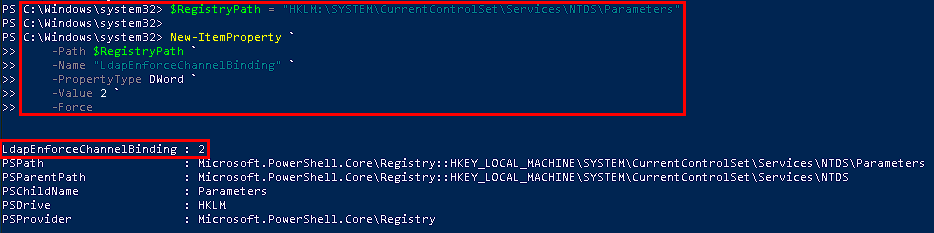
Find it and fix it this week. Two PowerShell scripts allow for detection and remediation, plus the GUI path if you prefer that workflow.
# Check the current LDAP channel binding enforcement level
# Values: 0=Disabled, 1=Enabled when supported, 2=Always required
Get-ItemProperty -Path "HKLM:\SYSTEM\CurrentControlSet\Services\NTDS\Parameters" -Name "LdapEnforceChannelBinding“
# Enable LDAPS channel binding on a domain controller.
$RegistryPath = "HKLM:\SYSTEM\CurrentControlSet\Services\NTDS\Parameters"
Set-ItemProperty -Path $RegistryPath -Name "LdapEnforceChannelBinding" -Value 2 -Type DWord
PowerShell remediation example
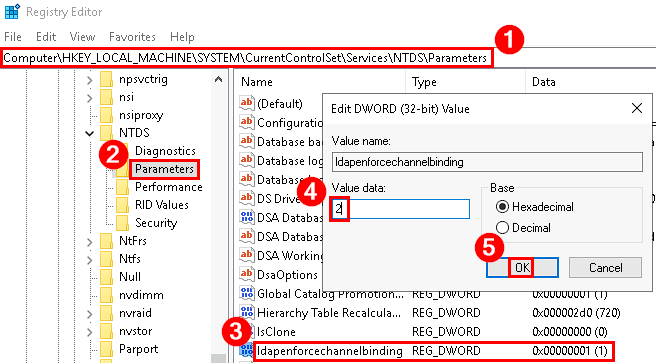
GUI remediation path
Open Registry Editor
Launch regedit on the domain controller.
Navigate to the NTDS Parameters key
Browse to HKEY_LOCAL_MACHINE\SYSTEM\CurrentControlSet\Services\NTDS\Parameters.
Create or modify ‘LdapEnforceChannelBinding’
Locate or create the DWORD value ‘LdapEnforceChannelBinding’. Set it to 2 to enforce channel binding for all LDAPS connections.
Apply the change
Close Registry Editor. A restart may be required. Monitor the Directory Service event log for any LDAPS connection failures after the change.
Turn benchmarks into remediation focus.
Run an Insight Recon scan to evaluate 155+ Active Directory security checks, uncover the weaknesses attackers are most likely to exploit, and turn benchmark data into a prioritized remediation plan.
Benchmark your environment with a free Active Directory security scan.
Frequently asked questions
Where does the data in the Active Directory Signal come from?
Every Signal report is built from real Active Directory scan results, anonymized and voluntarily shared by Insight Recon users. This month's report reflects 173 environments. This data is ingested through real scans and not surveys or self-reported scores.
How does Insight Recon decide a finding's severity?
Every finding is graded Critical, High, Moderate, or Low based on how directly it can be exploited and how much access it grants if abused. A Critical finding means an attacker with that foothold could reach a near-immediate path to compromise, not just a theoretical weakness.
Is my organization part of this report?
Only if you scanned with Insight Recon and opted in to anonymized benchmark sharing. Every environment in this report is stripped of identifying details before it's aggregated, individual results are never singled out.
How often is the Active Directory Signal published?
Monthly, with a quarterly deep-dive and an annual report joining the cadence as they launch. Each one draws from the same live scan data, so you can track how findings trend month over month.
Can I see how my own environment compares to this benchmark?
Yes. A free Insight Recon scan checks your environment against the same Active Directory security checks behind this report, so you can see exactly where you land against this month's numbers.
See your own numbers, not the average.
Run a free Active Directory security assessment and find out where your environment stands against this month's Signal.
This report reflects 173 anonymized Active Directory environments scanned in September 2026. Findings are aggregated and no individual environment is identifiable. If you'd like a check investigated further, or added to the scan, tell us and we'll factor it into next month's Signal.