
Active Directory Security Benchmark – August 2026 Signal
Active Directory Signal · August 2026
Real data from real Active Directory environments.
Active Directory security benchmarks based on anonymized scan data from real environments, showing what organizations are actually exposed to in practice.
The data in this report comes from 105 anonymized Active Directory scan results, voluntarily shared by Insight Recon users. Together, they form an Active Directory security benchmark for understanding how real environments are configured and secured. This month's data points to a familiar pattern: environments aren't failing on obscure edge cases, they're carrying the same handful of high-prevalence weaknesses, and most of them are fixable in a week.
Executive snapshot
Organizations weren't facing a single isolated weakness. They were facing overlapping risks, alongside a meaningful number of easier fixes that could deliver measurable improvement.
Key takeaway. There are enough easy wins in the average environment to create measurable risk reduction without waiting on a multi-year identity program.
Findings, by the numbers
Averaged and median findings per environment, before any remediation.
| Metric | Value |
|---|---|
| Average findings | 35.6 |
| Median findings | 37 |
| Average critical-severity findings | 2.4 |
| Average high-severity findings | 13.4 |
Severity mix
The average environment had 13.4 High findings and 2.4 Critical findings before remediation began. High-severity findings dominate the typical environment far more than Critical ones do, which is exactly where the easy wins tend to live.
Finding snapshot
These findings appeared consistently across the environments analyzed, revealing recurring weaknesses in privileged access, password hygiene, and delegation.
Risky AdminSDHolder permissions
Every environment scanned carried non-default, risky ACL entries on AdminSDHolder.
Dangerous control over privileged objects
Most environments had at least one account that could reset privileged passwords or modify privileged groups.
Privileged users allowed to be delegated
In most environments, at least one privileged account could be delegated, increasing the risk that a compromised service could expose elevated access.
Top findings this month
Among checks with enough evaluated environments, the highest-prevalence findings clustered around privileged access, legacy compatibility, and account hygiene.
Analyst note. This month's data shows that the biggest opportunities are not obscure edge cases. They're familiar, high-prevalence weaknesses that can materially reduce attack surface when addressed consistently. AdminSDHolder risky permissions and Net Session Enumeration are the clearest quick wins.
Trend watch
Comparing each month's benchmark data reveals where common security exposures are improving, worsening, or holding steady. This initial report data was compared to beta user environments.
Vulnerable PKI object access control in ADCS (ESC5)
Schema Admins group not empty
Unsecured DNS zone configuration
Print spooler service enabled on domain controllers
Spotlight finding: Risky AdminSDHolder permissions
A finding that showed up in every single environment we scanned this month. Here's what it is, why it matters, and how to fix it.
Risky AdminSDHolder Permissions
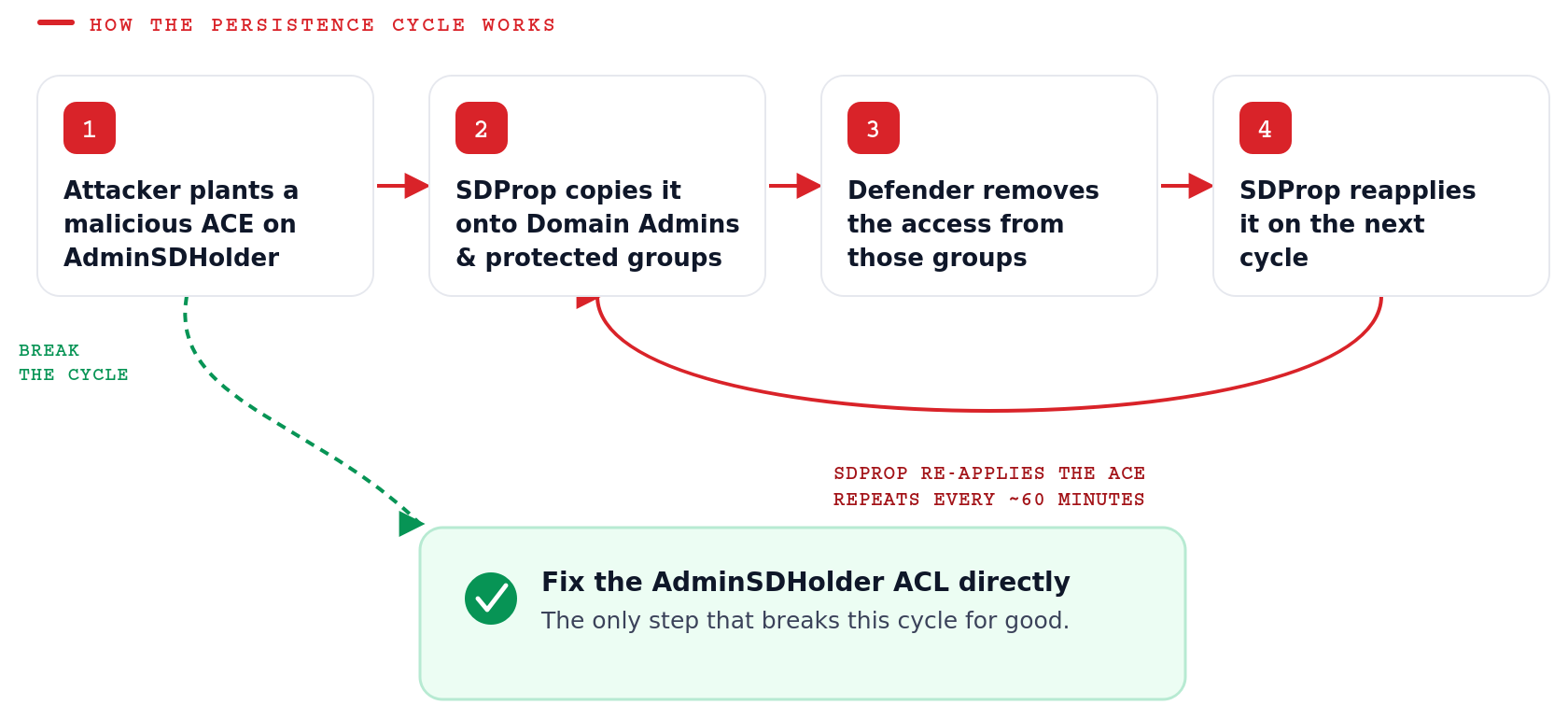
The AdminSDHolder object has non-standard permissions that grant dangerous control to one or more principals. Because AdminSDHolder permissions are periodically applied to protected administrative accounts and groups, improper access can propagate across privileged objects. This condition can create both privilege escalation and persistence risk within the domain.
AdminSDHolder is a classic persistence mechanism. An attacker with write access adds an access control entry granting themselves full control. Within about an hour, SDProp copies that entry onto Domain Admins, Administrators, and every other protected object. Even after defenders remove the access from those groups, SDProp re-adds it on the next cycle, so the backdoor survives cleanup until the AdminSDHolder ACL itself is fixed.
Spotlight remediation
Find it and fix it this week. Two PowerShell paths depending on whether you're checking a single object or rolling a fix out at scale, plus the GUI path if you prefer that workflow.
# Review the AdminSDHolder ACL.
dsacls "CN=AdminSDHolder,CN=System,<DomainDN>"
# Remove a non-default principal's permissions.
dsacls "CN=AdminSDHolder,CN=System,<DomainDN>" /R "<DOMAIN\Principal>"
# Remove approved principals (column: Principal) from AdminSDHolder.
$Items = Import-Csv -Path ".\ApprovedObjects.csv"
foreach ($Item in $Items) {
    <Approved-Remediation-Command> "CN=AdminSDHolder,CN=System,<DomainDN>" /R $Item.Principal
}
GUI remediation path
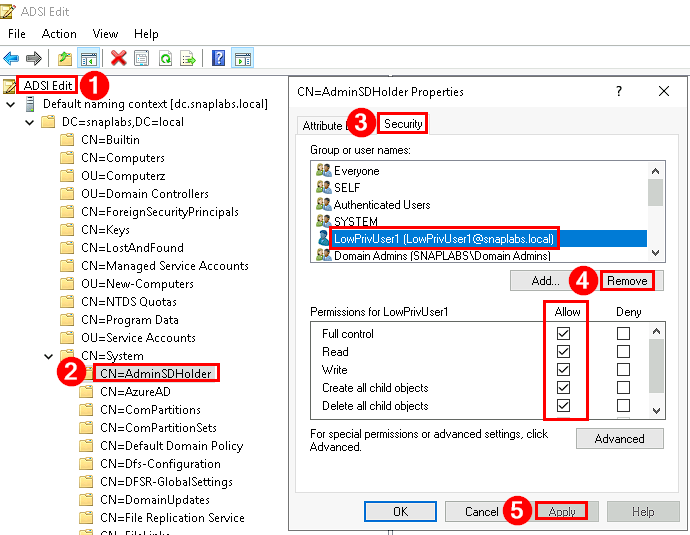
Open ADSI Edit
Run adsiedit.msc and connect to the Default naming context.
Locate AdminSDHolder
Browse to CN=System, then CN=AdminSDHolder.
Open Security
Right-click AdminSDHolder, select Properties, and open the Security tab.
Remove non-default entries
Remove any principal other than SYSTEM, Administrators, Domain Admins, and Enterprise Admins that holds full control, write, write-DACL, or write-owner.
Save the change
Click OK. SDProp will propagate the corrected descriptor on its next cycle.
Turn benchmarks into remediation focus.
Run an Insight Recon scan to evaluate 135+ Active Directory security checks, uncover the weaknesses attackers are most likely to exploit, and turn benchmark data into a prioritized remediation plan.
Insight Recon · Active Directory Scanner. Read-only scan, 135+ checks, report in minutes. Benchmark your environment with a free Active Directory security scan.
Frequently asked questions
Where does the data in the Active Directory Signal come from?
Every Signal report is built from real Active Directory scan results, anonymized and voluntarily shared by Insight Recon users. This month's report reflects 105 environments. No surveys, no self-reported scores, just what a scan actually found.
How does Insight Recon decide a finding's severity?
Every finding is graded Critical, High, Moderate, or Low based on how directly it can be exploited and how much access it grants if abused. A Critical finding means an attacker with that foothold could reach a near-immediate path to compromise, not just a theoretical weakness.
Is my organization part of this report?
Only if you scanned with Insight Recon and opted in to anonymized benchmark sharing. Every environment in this report is stripped of identifying details before it's aggregated, individual results are never singled out.
How often is the Active Directory Signal published?
Monthly, with a quarterly deep-dive and an annual report joining the cadence as they launch. Each one draws from the same live scan data, so you can track how findings trend month over month.
What is AdminSDHolder, and why does it matter this much?
AdminSDHolder is the template object Active Directory uses to lock down permissions on protected accounts and groups like Domain Admins. Every 60 minutes, a background process called SDProp reapplies its permissions to every protected object. A risky entry planted there survives normal cleanup, including password resets, because SDProp keeps reapplying it until the AdminSDHolder ACL itself is fixed. Microsoft's own documentation covers the full mechanism in more depth.
Can I see how my own environment compares to this benchmark?
Yes. A free Insight Recon scan checks your environment against the same 135+ Active Directory security checks behind this report, so you can see exactly where you land against this month's numbers.
See your own numbers, not the average.
Run a free, read-only Active Directory security assessment and find out where your environment stands against this month's Signal.
This report reflects 105 anonymized Active Directory environments scanned in August 2026. Findings are aggregated and no individual environment is identifiable. If you'd like a check investigated further, or added to the scan, tell us and we'll factor it into next month's Signal.