
DES and RC4 in Active Directory: Why Weak Kerberos Encryption Is Still a Risk
Plenty of domains still let Kerberos use DES and RC4, years after AES replaced them. Tickets issued with those ciphers are far easier to crack offline. That's the weakness behind Kerberoasting, the technique that helped turn one phishing click into a 5.6 million record breach at Ascension. Here's how to find the domain controllers that still allow them and move to AES.
| Priority | Moderate. Higher if you have service accounts with SPNs, since RC4 is what makes those crackable |
|---|---|
| What it means | One or more domain controllers advertise DES or RC4 for Kerberos in their msDS-SupportedEncryptionTypes attribute |
| Who's affected | The domain controllers that still list a weak cipher. Everything that gets a ticket from them inherits the exposure |
| Fix | Set the Kerberos encryption types policy on your domain controllers to AES only, after you've confirmed nothing still needs RC4 |
Check it now: what do your domain controllers advertise?
Import-Module ActiveDirectory
Get-ADDomainController -Filter * | ForEach-Object {
    $dc = Get-ADComputer $_.Name -Properties msDS-SupportedEncryptionTypes
    [pscustomobject]@{
        DomainController = $_.HostName
        EncTypes         = $dc.'msDS-SupportedEncryptionTypes'
    }
}
Runs as any domain user with the AD module. 24 is AES only. A value with the 1, 2 or 4 bit set, like 28 or 39, means DES or RC4 is still advertised. A blank value means that DC uses the domain default instead.
Scan your domain now, or send the link to your work inbox.
The scan runs from a domain-joined Windows machine with a standard domain account. The free plan covers every on-prem AD check.
What the finding means
Every domain controller has a computer account in Active Directory. That account has an attribute called msDS-SupportedEncryptionTypes. It's a bitmask that says which Kerberos encryption types the machine will use. Windows fills it in from the Network security: Configure encryption types allowed for Kerberos policy. In a normal setup the attribute mirrors whatever that policy is set to on the domain controller.
This check reads that attribute over LDAP on each domain controller. It fails when any of them advertise a weak cipher: DES-CBC-CRC, DES-CBC-MD5 or RC4-HMAC. The internal name is DesRc4SupportEnabled. DES trips it just like RC4 does. The accounts it flags are the domain controllers themselves, listed by host name.
If no domain controller has the attribute set at all, the check reports not assessed rather than a pass or a fail. It skips those DCs. An empty attribute means the machine is falling back to a domain-wide default instead, which is worth checking separately (more on that below).
The value is a sum of bits. These are the ones that matter here:
| Encryption type | Bit | Verdict |
|---|---|---|
| DES-CBC-CRC | 0x1 | Fails. Broken for decades |
| DES-CBC-MD5 | 0x2 | Fails. Same |
| RC4-HMAC | 0x4 | Fails. Crackable offline |
| AES128-CTS-HMAC-SHA1-96 | 0x8 | Keep |
| AES256-CTS-HMAC-SHA1-96 | 0x10 | Keep |
So a value of 24 (0x18) is AES128 and AES256 only, which passes. 28 (0x1C) adds RC4 back in and fails. 39 (0x27) is the old post-2022 default with both DES and RC4, which fails too.
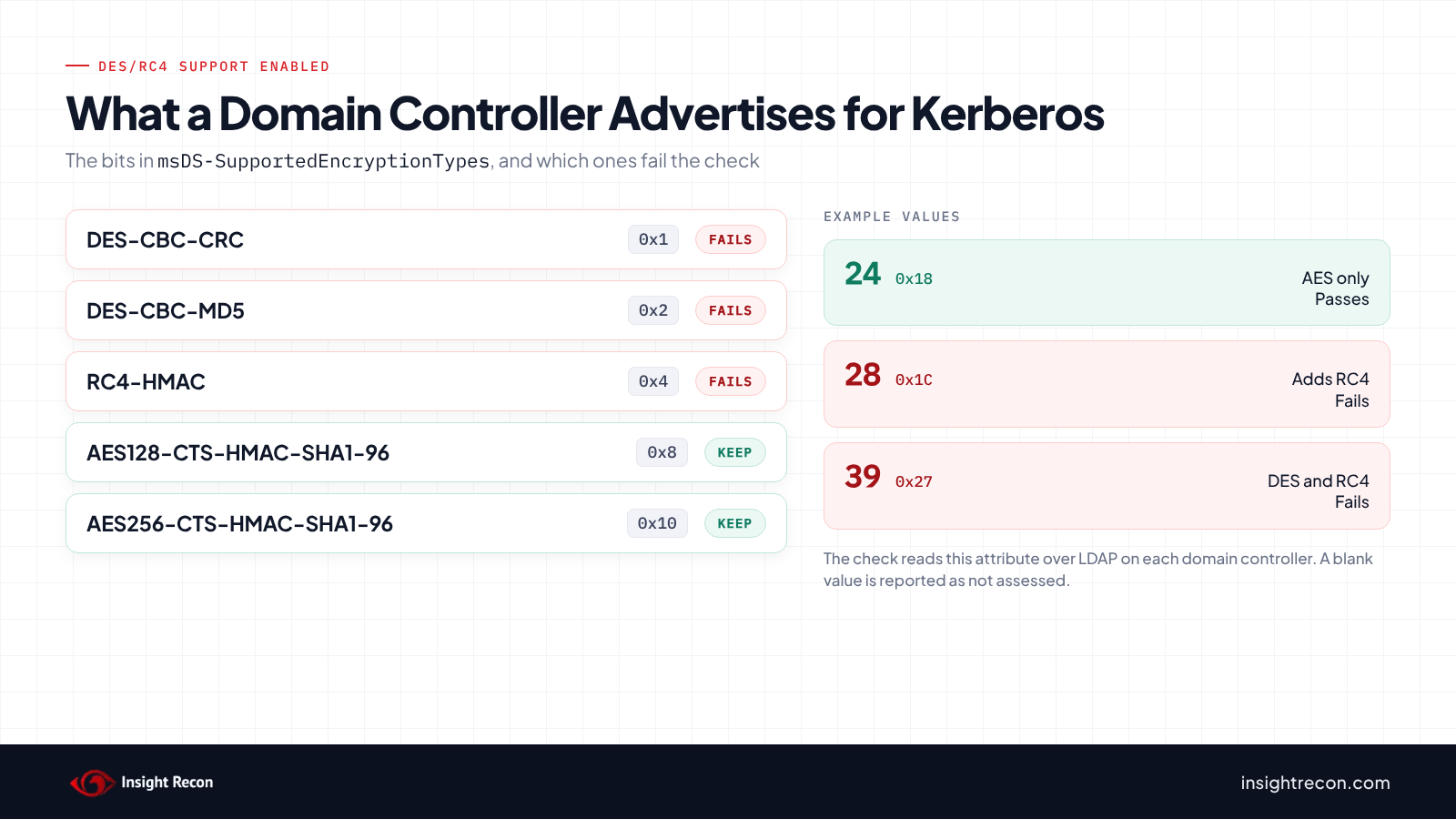
msDS-SupportedEncryptionTypes add up to. Tap to enlarge.Why DES and RC4 are a Kerberos risk
RC4 and DES aren't just old. They change what an attacker can do with a Kerberos ticket. The RC4-HMAC key is the account's NT password hash, straight from RFC 4757. There's no salt and no iterated hashing. An RC4 ticket can be cracked offline about as fast as the hardware can run guesses. An AES ticket uses a salted, iterated key, which is orders of magnitude slower to attack.
That difference is the whole basis of Kerberoasting. Any authenticated domain user can request a service ticket for any account that has a service principal name. If that ticket comes back as RC4, the attacker takes it offline and works on the service account's password at their own pace. The cracking is offline, where you can't watch it. Microsoft's own Kerberoasting guidance points straight at RC4 for this reason, because it "uses no salt or iterated hash when converting a password to an encryption key."
DES is worse on paper, with a 56-bit key that fails every modern baseline. It's been off by default since Windows 7 and Server 2008 R2. Finding it still advertised usually means an old setting that got carried forward. Either way, a domain controller that offers these ciphers is telling every client it's fine to use them.
How attackers use it
The path is short and quiet:
- The attacker already has any domain account, even an unprivileged one.
- They enumerate accounts with service principal names, which are usually service accounts, and often ones with more rights than they need.
- They request service tickets for those accounts. Where RC4 is allowed, the ticket comes back RC4.
- They take the tickets offline and crack the ones with weak or old passwords.
- A cracked service account password is reusable. If the account is over-permissioned, it's a step toward domain compromise.
The request in step 3 does log a 4769 event on your domain controllers. It looks like ordinary Kerberos traffic unless you're watching for the RC4 ticket encryption type. Step 4 is offline and invisible to you. That's why cutting off RC4 at the source beats trying to spot the requests.
Ascension and Microsoft's response
This isn't theoretical. In September 2025, Senator Ron Wyden asked the FTC to investigate Microsoft over the ransomware attack on Ascension, one of the largest hospital systems in the US. Per the letter, a contractor clicked a malicious link. The attackers reached the user directory and then used Kerberoasting, which the letter ties directly to RC4, an insecure 1980s cipher that Windows still supported by default. The attack spread ransomware across thousands of machines and exposed the personal information of 5.6 million people.
Microsoft's response was that RC4 makes up less than 0.1% of its traffic, but that turning it off everywhere at once would break too many systems. So the rollback happens in stages. Windows Server 2025 ships a security baseline that disables RC4 for Kerberos. Its domain controllers don't issue RC4 ticket-granting tickets at all.
The bigger shift landed in 2026. Microsoft removed the silent RC4 fallback that used to kick in for accounts with no encryption types set, under CVE-2026-20833. That change doesn't turn off RC4 where it's explicitly allowed, though, which is exactly what this check looks at. If your domain controllers advertise RC4 in their attribute, the 2026 update didn't touch that. You still have to turn it off yourself.
Check what your domain controllers allow
Read the attribute the check reads
This reads the same msDS-SupportedEncryptionTypes attribute on each domain controller's computer account that the finding does. It lists every domain controller and the raw value of its encryption types attribute. Run it as any domain user with the ActiveDirectory module installed.
Import-Module ActiveDirectory
Get-ADDomainController -Filter * | ForEach-Object {
    $dc = Get-ADComputer $_.Name -Properties msDS-SupportedEncryptionTypes
    [pscustomobject]@{
        DomainController = $_.HostName
        EncTypes         = $dc.'msDS-SupportedEncryptionTypes'
    }
}
What to look for:
- A blank
EncTypesmeans the attribute isn't set. The check skips that DC. The machine is using the domain-wide default instead. Check that next. - A value that includes
1,2or4once you break it into bits means DES or RC4 is advertised.24is clean,28has RC4,39has both DES and RC4. - To read the bits without the math, use
-band.28 -band 4returns4because RC4 is set, while24 -band 4returns0because it isn't. The same works with1and2for the two DES types.
Check the domain-wide default
When a domain controller's attribute is empty, the KDC falls back to a registry value. If that value still allows RC4, you're exposed even though the per-DC check came back not assessed.
Get-ItemProperty -Path 'HKLM:\SYSTEM\CurrentControlSet\Services\Kdc' -Name DefaultDomainSupportedEncTypes -ErrorAction SilentlyContinueWhat to look for: no output means the value isn't set and the built-in default applies. On domain controllers with the April 2026 or later updates, that default is AES only (0x18). On DCs that haven't taken those updates, it's still 0x27 (39), the default since November 2022, which includes RC4. A set value of 0x18 (24) is AES only. Run it on every domain controller, because it's a local registry setting.
Confirm the policy behind the attribute
The attribute comes from the Network security: Configure encryption types allowed for Kerberos policy. That's where the fix goes. You can read what's applied from the same registry value Windows writes it to.
Get-ItemProperty -Path 'HKLM:\SOFTWARE\Microsoft\Windows\CurrentVersion\Policies\System\Kerberos\Parameters' -Name SupportedEncryptionTypes -ErrorAction SilentlyContinueWhat to look for: this is the policy's value on the machine you run it on. It should match the attribute you read earlier. If they disagree, either someone edited the attribute by hand or the domain controller hasn't refreshed Group Policy since the policy changed. A value of 0x7ffffff8 is the hardened setting, which is AES128, AES256 and future types with DES and RC4 left out.
Don't stop at the domain controllers
This check is scoped to domain controllers, but RC4 can be allowed on service accounts individually too. Those are the Kerberoasting targets. After the DCs are clean, look at accounts with SPNs whose encryption settings still allow RC4. Our post on the 2026 RC4 change has the scripts for finding live RC4 tickets. Our DES-enabled accounts post covers the account side of DES.
Check it with Insight Recon
The checks above are the manual way. Insight Recon's read-only Active Directory security assessment flags this configuration for you, along with 150+ other checks:
- DES/RC4 Support Enabled (Moderate): flags domain controllers that advertise DES or RC4 in their encryption types attribute and names the ones that fail.
- User Accounts with DES Enabled (Moderate) and Accounts Vulnerable to Kerberoasting (High): cover the account side, where RC4 gets turned into cracked credentials.
- AES Not Enabled on Trust (Low) and Stale krbtgt Account Password (High): catch the trust and krbtgt gaps that go with a Kerberos cleanup.
Insight Recon reads configuration. It flags where DES and RC4 are allowed. It can't see your event logs or whether an account has AES keys. Pair it with Microsoft's scripts for the live usage.
Every finding comes with the attacker context and the remediation steps. Want to see what one looks like first? Here's a sample report.
See which domain controllers still allow DES or RC4.
The scan runs from a domain-joined Windows machine with a standard domain account. The free plan covers every on-prem AD check.
How to move your domain controllers to AES
Confirm nothing still needs RC4 first
Don't start by turning RC4 off. Start by finding out who's using it, or you'll break authentication for whatever still depended on it. Microsoft's RC4 detection guide has read-only scripts that pull RC4 usage from Kerberos event logs. Run them over a window long enough to catch monthly and quarterly jobs before you change anything.
Set your domain controllers to AES
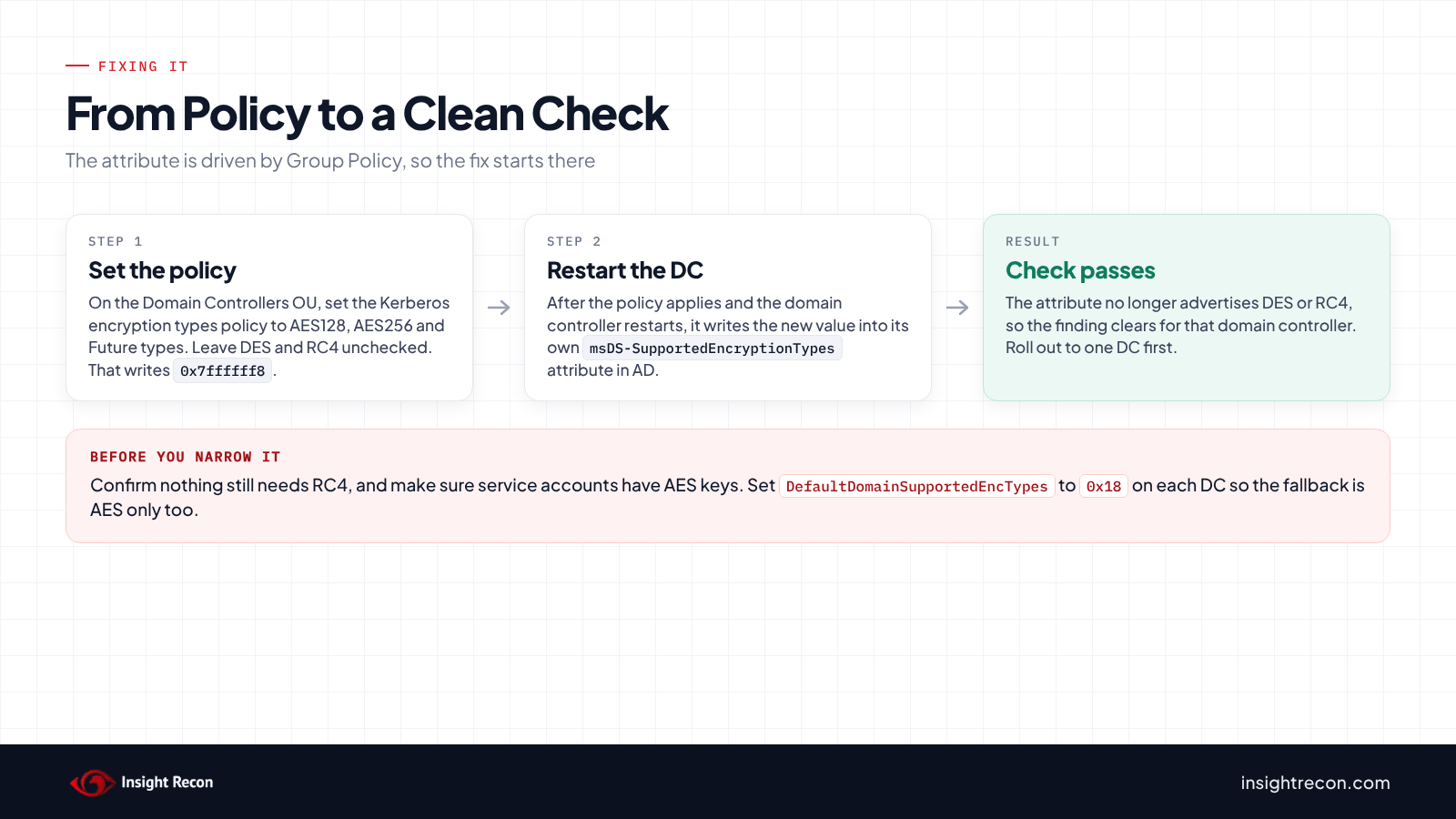
The attribute this check reads is driven by policy. The fix is a Group Policy change rather than an attribute edit. In a GPO scoped to your Domain Controllers OU, set Computer Configuration > Policies > Windows Settings > Security Settings > Local Policies > Security Options > Network security: Configure encryption types allowed for Kerberos. Check AES128_HMAC_SHA1, AES256_HMAC_SHA1 and Future encryption types. Leave the DES and RC4 boxes unchecked. That writes 0x7ffffff8.
After the policy applies and the domain controller restarts, it updates its own msDS-SupportedEncryptionTypes attribute. The check comes back clean. Roll this out to a single domain controller first and watch for authentication failures before you do the rest.
Fix the domain-wide default too
If DefaultDomainSupportedEncTypes is set and still includes RC4, accounts with no setting of their own keep getting it. The same goes for DCs that haven't taken the April 2026 updates, where an unset value still means RC4 is allowed. Set it to AES only so the fallback is safe:
Set-ItemProperty -Path 'HKLM:\SYSTEM\CurrentControlSet\Services\Kdc' `
    -Name DefaultDomainSupportedEncTypes -Type DWord -Value 0x18
Do this on every domain controller. 0x18 is AES128 and AES256 with no RC4 or DES. It's the AES-only default Microsoft's own 2026 update adopts. An older Microsoft KB recommends 0x38 for AES-only, which is also fine. Make sure service accounts have AES keys before you narrow the default, because an account with only RC4 keys will stop authenticating once RC4 is gone.
Give old accounts AES keys
An account only gets AES keys when its password changes. A service account created years ago, with a password nobody has reset since, may have nothing but an RC4 key. Resetting the password generates the AES keys. For service accounts, moving to a group Managed Service Account is better. It rotates its own password and keeps AES keys without anyone tracking it.
Handle trusts and Seamless SSO
Two spots get missed. A default parent-child trust supports RC4 but not AES, per Microsoft's trust troubleshooting article. Add AES to the trust with ksetup /setenctypeattr <other domain> RC4-HMAC-MD5 AES128-CTS-HMAC-SHA1-96 AES256-CTS-HMAC-SHA1-96, run on a DC in each domain. That adds AES without dropping RC4 before both sides are ready.
If you use Entra Seamless SSO, the AZUREADSSOACC computer account often still runs on RC4. Microsoft recommends moving it to AES256. You have to roll over its Kerberos decryption key before you switch the encryption type, or SSO breaks. Microsoft also recommends rolling that key over at least every 30 days regardless.
Treat DES and RC4 as legacy crypto
AES has been the default for Kerberos for years. DES and RC4 only stay around because old settings carried forward and nobody circled back. Find the domain controllers still advertising them and move the domain to AES. Keep any RC4 exception scoped to one account with an end date.
Validation checklist
- Does every domain controller's
msDS-SupportedEncryptionTypesexclude DES (0x1,0x2) and RC4 (0x4)? - Is
DefaultDomainSupportedEncTypesset to AES only, or confirmed safe, on every DC? - Did you confirm nothing still depends on RC4 before turning it off?
- Do your service accounts have AES keys so they keep working once RC4 is gone?
- Are trusts and the Seamless SSO account handled separately?
A no on any of these means some part of your domain is still fine with weak Kerberos encryption.
Compliance mapping
Allowing DES and RC4 is a configuration and credential-protection problem at once. It lines up with the control frameworks the same way your other Kerberos hardening does.
| Framework | Reference | Why it applies |
|---|---|---|
| NIST CSF 2.0 | PR.AA-03 | Authenticating users and services. DES and RC4 are weak ways to protect Kerberos tickets. |
| CIS Controls v8 | 3 (Data Protection), 4 (Secure Configuration) | Remove weak cryptography and keep a secure baseline on domain controllers. |
| MITRE ATT&CK | T1558.003 | Kerberoasting, which RC4 service tickets make practical. |
| DISA STIG | WN25-SO-000290 | Requires the Kerberos encryption types policy to allow only AES. |
| ANSSI | vuln_kerberos_properties_deskey | Flags accounts still allowed to use DES keys for Kerberos. |
FAQ
Does this check look at the Group Policy setting?
No. It reads the msDS-SupportedEncryptionTypes attribute on each domain controller's computer account over LDAP. It never opens a GPO or the registry. Windows normally sets that attribute from the encryption types policy. The two usually match, but the check reads the attribute itself rather than the policy.
Why did it come back "not assessed"?
None of your domain controllers have the attribute set. The check skips those rather than guessing. When the attribute is empty, the KDC uses the domain-wide DefaultDomainSupportedEncTypes value instead. Check that registry value to know what's actually allowed.
Is this the same thing as the 2026 Kerberos RC4 change?
Related, but not the same. The 2026 update (CVE-2026-20833) removed the silent RC4 fallback for accounts with no setting. This check is about RC4 and DES being explicitly advertised by your domain controllers, which that update doesn't touch. Our RC4 change post covers the update.
Will turning off RC4 break anything?
It can, if something still depends on it. That's why you audit first. The usual breakers are old service accounts with no AES keys and non-Windows devices that only speak RC4. Default trusts are another. Reset passwords and add AES to trusts before you remove RC4.
What value should the attribute be?
24 (0x18) for AES128 and AES256, or 0x7ffffff8 if you set it through the policy with Future encryption types checked. Both exclude DES and RC4, which is what passes the check.
See what else in your AD still runs on legacy crypto.
Insight Recon checks RC4, DES, NTLMv1 and the rest of your AD from a domain-joined Windows machine with a standard account. Free and read-only.
Not ready to scan?
AD Signal is our monthly look at what's changing in AD security and how real domains score. Read the latest report.
References
- Microsoft Learn: Detect and remediate RC4 usage in Kerberos
- Microsoft Support: How to manage Kerberos KDC usage of RC4 for service account ticket issuance changes related to CVE-2026-20833
- Microsoft Support: KB5021131, managing Kerberos changes for CVE-2022-37966
- Microsoft Security Blog: Guidance to help mitigate Kerberoasting
- RFC 4757: The RC4-HMAC Kerberos encryption types
- Senator Wyden's letter to the FTC on the Ascension breach
- Microsoft Learn: "Unsupported etype" error accessing a trusted domain