
Kerberos RC4 Is Now Off by Default: What Breaks and How to Fix It
Since April 2026, domain controllers don't fall back to Kerberos RC4 for service accounts with no encryption types set. The July update removed the rollback. Old service accounts and Linux keytabs that leaned on that fallback can now fail. Here's how to find them and move them to AES.
| Priority | High if any service, app or device in your domain still gets RC4 Kerberos tickets |
|---|---|
| What changed | Domain controllers now assume AES only for accounts without explicit encryption types. The RC4DefaultDisablementPhase rollback stopped working with the July 2026 update |
| Who's affected | Service accounts with no AES keys, plus anything that only speaks RC4, like older appliances or RC4-only keytabs |
| What to look for | KDCSVC events 201 to 209 in the System log on your domain controllers. 203, 204, 208 and 209 mean a request was blocked |
| Fix | Give accounts AES keys with a password reset and set them to AES. Regenerate keytabs. Allow RC4 explicitly only as a short, documented exception |
Check it now: is anything being blocked?
Get-WinEvent -FilterHashtable @{ LogName = 'System'; Id = 201..209 } -ErrorAction SilentlyContinue |
    Where-Object { $_.ProviderName -match 'Kdc|Kerberos-Key-Distribution-Center' } |
    Select-Object -First 200 |
    Format-List TimeCreated, Id, ProviderName, Message
Run it on a domain controller. Any 203, 204, 208 or 209 means a request was blocked. An empty result isn't proof you're clean. Check the domain default too.
Scan your domain now, or send the link to your work inbox.
The scan runs from a domain-joined Windows machine with a standard domain account. The free plan covers every on-prem AD check.
What changed in 2026
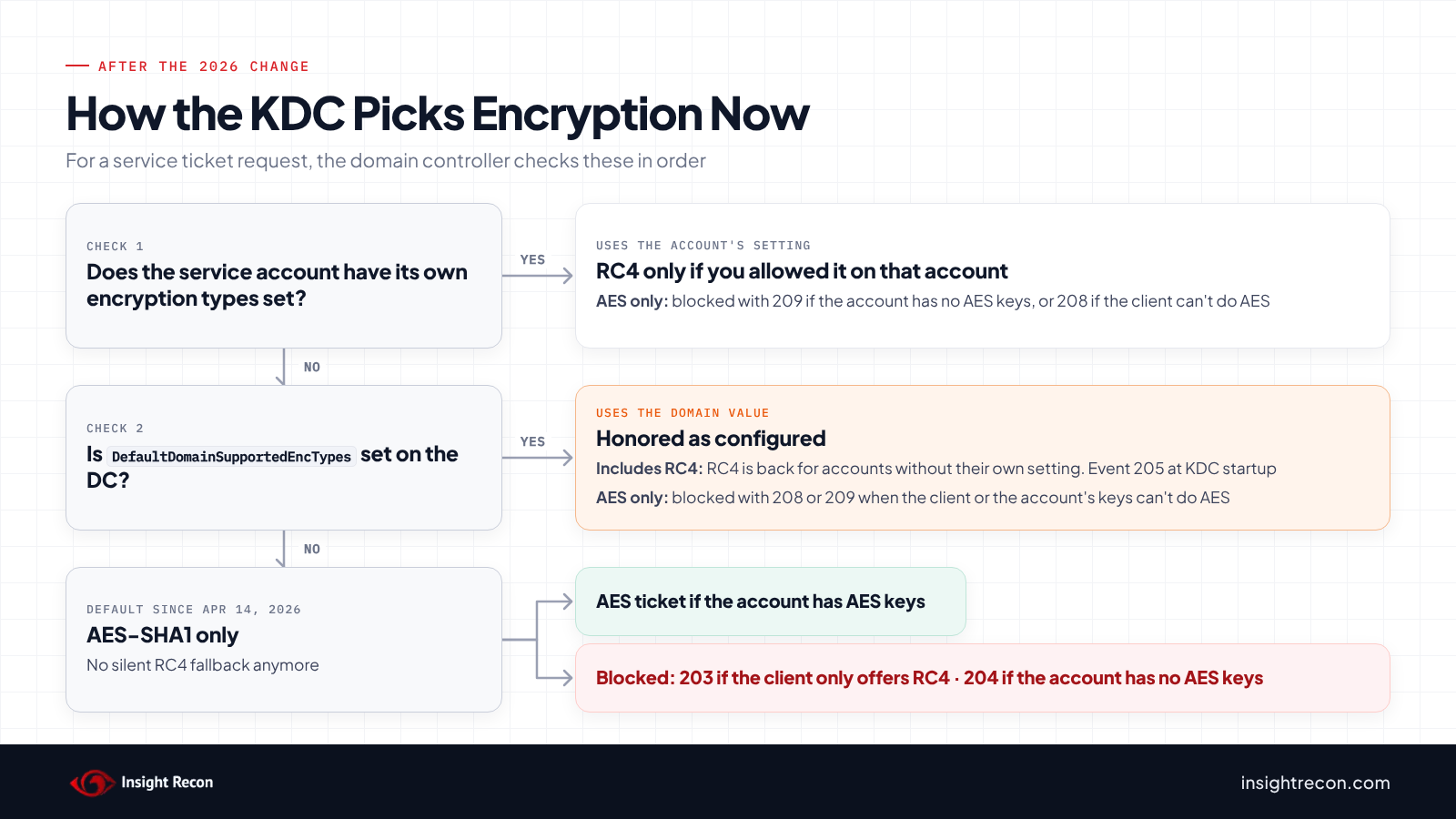
When a client asks for a service ticket, the domain controller picks an encryption type based on what the service account supports. If the account's msDS-SupportedEncryptionTypes attribute was empty, domain controllers used to fall back to a default that included RC4. Lots of service accounts never had that attribute set. They kept getting RC4 tickets without anyone choosing that.
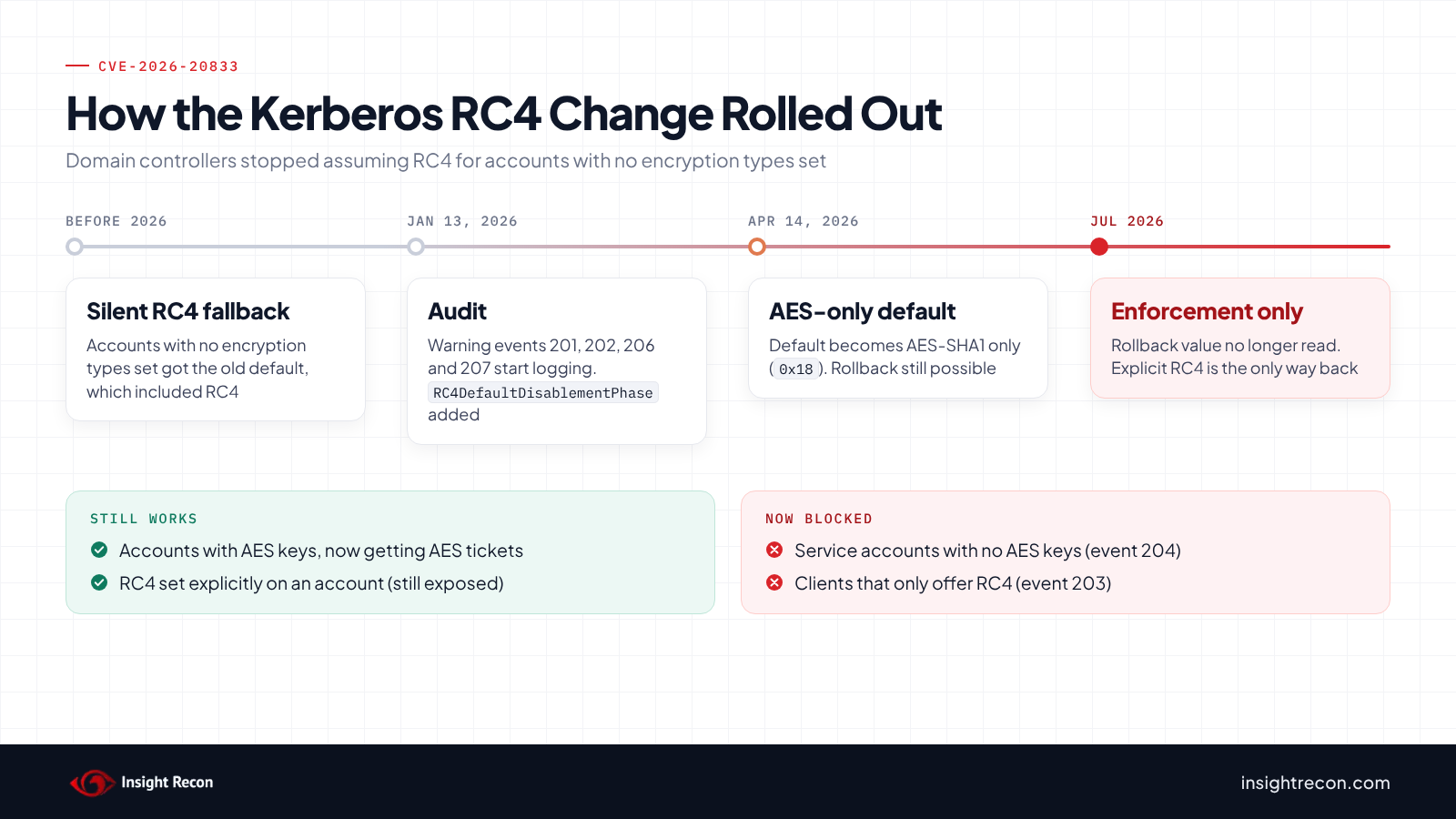
Microsoft changed that default in three steps under CVE-2026-20833:
- January 13, 2026: domain controllers started logging warning events 201, 202, 206 and 207 for requests that would break once enforcement started. Microsoft also added the
RC4DefaultDisablementPhaseregistry value so you could turn enforcement on early. - April 14, 2026: the default for accounts with no explicit encryption types became AES-SHA1 only (
0x18).RC4DefaultDisablementPhasestill worked as a manual rollback. - July 2026: the rollback went away. Domain controllers stopped reading
RC4DefaultDisablementPhaseand enforcement is now the only supported behavior.
RC4 isn't gone completely. Microsoft still honors RC4 when you set it explicitly on an account or in the domain-wide DefaultDomainSupportedEncTypes value. It has also said it won't remove the ability to configure the domain-wide value. What changed is the silent fallback. If you never configured anything, you now get AES or nothing.
Separately, domain controllers running Windows Server 2025 don't issue RC4 ticket-granting tickets at all, according to Microsoft's RC4 detection guide. That's a different limit from the 2026 change. It's worth knowing if you're adding 2025 DCs.
Why Microsoft is removing RC4
RC4 service tickets are much faster to crack offline than AES tickets. That's what makes Kerberoasting practical: any domain user can request a service ticket for an account with an SPN, take it offline and work on the password. Microsoft's announcement calls out Kerberoasting directly and says "Secure Windows authentication does not require RC4." AES has been supported across every supported version of Windows for years. The fallback stuck around for compatibility. Most environments never went back and set encryption types on old accounts.
Microsoft rates CVE-2026-20833 as an Important information disclosure bug (CVSS 5.5). It wasn't exploited or publicly disclosed when it was published. The score undersells the practical impact, though. The fix changed how every domain controller issues service tickets.
What breaks and what doesn't
Most of what breaks here is old. A service account created years ago, with a password nobody has changed since, may not have AES keys at all. A NAS or a Java app might only offer RC4. A Linux host might be using a keytab exported with only an RC4 key. None of those were a conscious choice. They worked because the domain controller filled in RC4 for them.
Microsoft's KB warns that a clean audit log doesn't guarantee every non-Windows device will accept the new tickets. A keytab that only holds an RC4 key, for an account that now gets AES tickets, can't decrypt them. The KDC is happy and the app still fails. Those are the hardest ones to track down.
| Scenario | Since enforcement |
|---|---|
| Service account with no encryption types set and no AES keys (password never changed since before AES) | Blocked. Event 204 |
| Client or device that only offers RC4, asking for a ticket to an account with no encryption types set | Blocked. Event 203 |
| Account set to AES only, but missing AES keys | Blocked. Event 209 |
| Non-Windows service using a keytab with only an RC4 key | Fails at the service. The KDC issues an AES ticket the service can't read |
| Account with AES keys and no explicit setting | Works, now with AES |
| Account explicitly set to allow RC4 | Still works, still exposed |
Find what's still using Kerberos RC4
Check the KDCSVC events
Every domain controller logs these in the System log. Run this on each DC, or collect them centrally with Windows Event Forwarding or your SIEM. It pulls the most recent RC4-related KDC events from the DC you run it on.
Get-WinEvent -FilterHashtable @{ LogName = 'System'; Id = 201..209 } -ErrorAction SilentlyContinue |
    Where-Object { $_.ProviderName -match 'Kdc|Kerberos-Key-Distribution-Center' } |
    Select-Object -First 200 |
    Format-List TimeCreated, Id, ProviderName, Message
What to look for:
- 203: blocked because the client only offered RC4 and the service account has no encryption types set.
- 204: blocked because the service account only has RC4 keys. Reset its password.
- 208: blocked because the client doesn't offer AES and the service account, or the domain-wide value, is set to AES only.
- 209: blocked because the service account, or the domain-wide value, is set to AES only but the account has no AES keys.
- 205: logged at KDC startup when
DefaultDomainSupportedEncTypesexplicitly includes insecure types like RC4. - 201, 202, 206, 207: the audit-phase warnings that turn into 203, 204, 208 and 209 under enforcement. You'd mostly see these on DCs that haven't taken the April 2026 or later updates.
Two catches from Microsoft's notes. If DefaultDomainSupportedEncTypes is set manually, 201 and 202 aren't logged. If that value includes RC4, event 205 at KDC startup may be the only sign. A quiet log doesn't prove you're clean. Check the domain value too (below).
Find RC4 tickets with Microsoft's scripts
Microsoft publishes two read-only scripts in its Kerberos-Crypto repository that read the newer fields in Security events 4768 and 4769. Those fields exist on Windows Server 2019 and later, and on 2016 with the January 2025 update. Run them on a DC as a Domain Admin or equivalent. Kerberos ticket auditing needs to be on.
# Every ticket or session key that used RC4 in the last 30 days, across all DCs
.\Get-KerbEncryptionUsage.ps1 -Encryption RC4 -SearchScope AllKdcs -Since (Get-Date).AddDays(-30)

# Accounts seen in that window that have no AES keys
.\List-AccountKeys.ps1 -NotContainsKeyType AES-SHA1 -SearchScope AllKdcs -Since (Get-Date).AddDays(-30) |
    Sort-Object Name -Unique
What to look for: the first command gives you the requester, the target account and whether the ticket or the session key was RC4. That's your list of real, live RC4 dependencies. The second lists accounts with no AES keys, which need a password reset. Both only see accounts that requested tickets in that window. Run them over a long enough period to catch monthly and quarterly jobs.
- Log retention: the scripts can only go back as far as your Security log does, which is often hours or days on a busy DC. For a 30-day window, increase the log size or search forwarded 4768 and 4769 events in your SIEM instead.
- Mixed DC versions:
-SearchScope AllKdcsneeds remote Event Log access.List-AccountKeys.ps1also picks how to recognize AES keys based on the OS it runs on. With a mix of Server 2025 and older DCs, it can list accounts that actually have AES keys. In that case run it on each DC with the default local scope.
Check service accounts' encryption settings
The scripts show what's happening. This shows how your service accounts are configured, including ones that haven't been used lately.
Import-Module ActiveDirectory
Get-ADUser -Filter 'ServicePrincipalName -like "*"' -Properties msDS-SupportedEncryptionTypes, PasswordLastSet |
    Select-Object SamAccountName, PasswordLastSet,
        @{ n = 'EncTypes'; e = { $_.'msDS-SupportedEncryptionTypes' } } |
    Sort-Object PasswordLastSet
What to look for: an empty EncTypes means the account uses the domain default. That's AES only now, unless DefaultDomainSupportedEncTypes says otherwise. Those work as long as the account has AES keys. Old PasswordLastSet dates at the top of the list are your best candidates for accounts without AES keys. A value of 4 means the account is explicitly set to RC4 only. A value that includes 8 or 16 (like 24 or 28) means AES is allowed.
Check the domain default
This reads the domain-wide value on the DC you run it on.
Get-ItemProperty -Path 'HKLM:\SYSTEM\CurrentControlSet\Services\Kdc' -Name DefaultDomainSupportedEncTypes -ErrorAction SilentlyContinueWhat to look for: no output means the value isn't set and the AES-only default applies. If it's set to something that includes RC4 (like 0x24 or 0x1C), RC4 is still allowed for every account without its own setting. It's a per-DC registry value. Run this on every DC.
Check it with Insight Recon
The event logs and scripts above show live RC4 usage. Insight Recon's read-only Active Directory security assessment checks the configuration side, along with 150+ other checks:
- DES/RC4 Support Enabled (Moderate): flags when your domain controllers still advertise DES or RC4 for Kerberos.
- AES Not Enabled on Trust (Low): flags trusts that don't have AES enabled.
- Accounts Vulnerable to Kerberoasting (High) and Stale krbtgt Account Password (High): cover the attack RC4 makes easier and the krbtgt cleanup in the fix section.
Insight Recon reads your configuration. It can't see your domain controller event logs or whether an account actually has AES keys. For those, use the KDCSVC events and Microsoft's scripts. If you're cleaning up DES too, our post on DES-enabled accounts covers it.
Every finding comes with the attacker context and the remediation steps. Want to see what one looks like first? Here's a sample report.
Find where your domain still allows RC4 and DES.
The scan runs from a domain-joined Windows machine with a standard domain account. The free plan covers every on-prem AD check.
How to fix it
Give the account AES keys
An account only gets AES keys when its password changes. For anything flagged by event 204 or 209, or listed by List-AccountKeys.ps1, reset the password and update it everywhere the service uses it. If it's a service you can move to a group Managed Service Account (gMSA), do that instead. A gMSA rotates its own long password and gets AES keys automatically.
Set the account to AES
Once the account has AES keys, set its encryption types explicitly so it doesn't depend on any default:
Set-ADUser -Identity svc-app01 -KerberosEncryptionType AES128, AES256That sets msDS-SupportedEncryptionTypes to 24 (AES128 and AES256). Do it after the password reset. An account set to AES only without AES keys fails with event 209. For computer accounts, use the Group Policy setting Network security: Configure encryption types allowed for Kerberos and restart the machine so it updates its own attribute.
Regenerate non-Windows keytabs
If a Linux host or an appliance authenticates with a keytab, regenerate the keytab with AES keys after you reset the account's password. Then test the actual service, since that's where these failures show up. If a device really can't do AES, Microsoft asks you to email [email protected] with details on the device and your upgrade plans. The long-term answer is replacing it.
Use explicit RC4 only as a temporary exception
If something can't move yet, Microsoft's guidance is to allow RC4 on that one account rather than the whole domain. The value it recommends is 0x24, which allows RC4 tickets with AES session keys:
Set-ADUser -Identity svc-legacy01 -Replace @{ 'msDS-SupportedEncryptionTypes' = 0x24 }That account can be Kerberoasted with RC4 again. Give it a long random password and a documented end date. Setting DefaultDomainSupportedEncTypes to include RC4 does the same thing for every account without its own setting. Microsoft calls that a last resort because it leaves every account in the domain vulnerable.
Check krbtgt and your trusts while you're there
Two related things are worth a look during the same cleanup, even though Microsoft's 2026 change doesn't touch them directly.
- krbtgt: if the krbtgt password hasn't been reset in years, plan a reset using Microsoft's guidance. Reset it, wait for replication and at least the maximum ticket lifetime (10 hours by default), then reset it again. Two resets back to back break tickets that are still in use. An old krbtgt password is a Golden Ticket risk on its own.
- Trusts: Microsoft's trust troubleshooting article notes that a default parent-child trust supports RC4 but not AES. The 2026 change doesn't affect trust referrals, but adding AES is the right move before you try to disable RC4 anywhere else. Microsoft's article shows how to add AES alongside RC4 with
ksetup /setenctypeattr <other domain> RC4-HMAC-MD5 AES128-CTS-HMAC-SHA1-96 AES256-CTS-HMAC-SHA1-96, run on a DC in each domain. Checking The other domain supports Kerberos AES Encryption in Active Directory Domains and Trusts switches the trust to AES only. Save that for when both sides are ready.
Treat RC4 as legacy authentication
RC4 has been the weak spot in Kerberos for years. The domain controller no longer fills it in for you. Find what's still asking for it and get those accounts onto AES. Keep any explicit exception short and documented.
Validation checklist
- Have you checked every domain controller for KDCSVC events 203, 204, 208 and 209?
- Did you run Microsoft's scripts over a long enough window to catch monthly and quarterly jobs?
- Do service accounts with old passwords have AES keys now?
- Is every explicit RC4 exception scoped to one account with an end date?
- Is
DefaultDomainSupportedEncTypesunset, or set to AES only, on every DC?
A no on any of these means there's RC4 in your domain you haven't accounted for yet.
Compliance mapping
Kerberoasting gets a lot harder once service tickets are AES. Getting off RC4 is a credential protection fix as much as an encryption one.
| Framework | Reference | Why it applies |
|---|---|---|
| NIST CSF 2.0 | PR.AA-03 | Users, services and hardware are authenticated. RC4 is a weak way to protect Kerberos tickets. |
| CIS Controls v8 | 4 (Secure Configuration) | Secure configuration baselines. DISA's Windows Server 2025 STIG (WN25-SO-000290) allows only AES for Kerberos. |
| MITRE ATT&CK | T1558.003 | Kerberoasting, which RC4 service tickets make much easier. |
| Microsoft guidance | CVE-2026-20833 | Move service accounts and devices to AES and treat explicit RC4 as a temporary exception. |
FAQ
Can I turn the old behavior back on?
Not with RC4DefaultDisablementPhase. Domain controllers stopped reading it with the July 2026 update. You can still allow RC4 explicitly on an account, or in DefaultDomainSupportedEncTypes, but both leave those accounts exposed and the domain-wide value logs event 205.
Does this affect trusts or non-Windows KDCs?
Microsoft says the change only affects Windows domain controllers and doesn't change trust or referral flows. Non-Windows services in your domain can still break if their keytabs only hold RC4 keys.
Why does an app fail when the domain controller shows no error?
The KDC issued an AES ticket, but the service only has an RC4 key to decrypt it with. Regenerate the service's keytab with AES keys after resetting the account's password.
Do I need to set encryption types on every account?
No. Accounts with no setting get AES by default now, as long as they have AES keys. Setting it explicitly on service accounts is still a good idea. Then they don't depend on a default that could change again.
Is DES affected too?
DES has been off by default since Windows 7 and Server 2008 R2. If you still have accounts with DES enabled, our DES post covers finding and fixing them.
See what else in your AD still runs on legacy crypto.
Insight Recon checks RC4, DES, NTLMv1 and the rest of your AD from a domain-joined Windows machine with a standard account. Free and read-only.
Not ready to scan?
AD Signal is our monthly look at what's changing in AD security and how real domains score. Read the latest report.
References
- Microsoft Support: How to manage Kerberos KDC usage of RC4 for service account ticket issuance changes related to CVE-2026-20833
- Microsoft Security Update Guide: CVE-2026-20833
- Microsoft Learn: Detect and remediate RC4 usage in Kerberos
- Windows Server Blog: Beyond RC4 for Windows authentication
- Microsoft Kerberos-Crypto scripts on GitHub
- Microsoft Learn: "Unsupported etype" error when accessing a resource in a trusted domain