
Quick Summary
| Priority | High if any Wi-Fi, wired 802.1X or VPN connection uses PEAP-MSCHAPv2 or EAP-MSCHAPv2 with the user's Windows sign-in |
|---|---|
| What changed | The October 2026 update switched BlockNtlmv1SSO from Audit to Enforce on devices where the value isn't set |
| Who's affected | Windows 11 24H2, 25H2 and 26H2, and Windows Server 2025, when Credential Guard isn't running |
| Symptom | Connections that used to sign in automatically now prompt for credentials or fail. Event 4025 appears in the NTLM operational log |
| Fix | Move to certificate-based authentication (EAP-TLS or PEAP-TLS). Use BlockNtlmv1SSO = 0 only as a short, scoped exception |
The SSO block mostly shows up on Wi-Fi, wired and VPN sign-ins. If you also want to know whether your domain controllers still accept NTLMv1 or LM, Insight Recon's free read-only scan checks that.
What Changed in the October 2026 Update
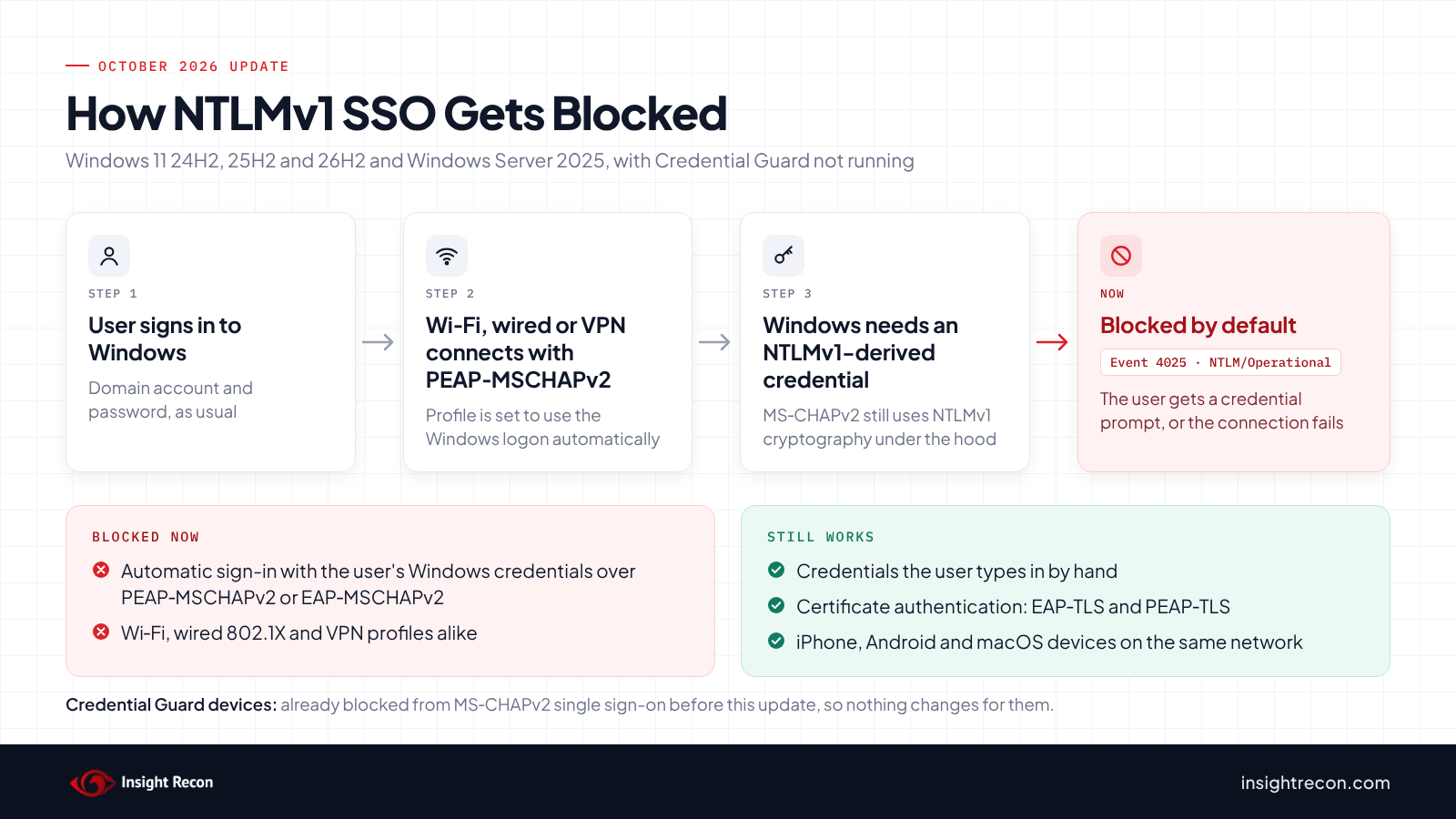
Microsoft removed the NTLMv1 protocol from Windows 11 24H2 and Windows Server 2025, but pieces of NTLMv1 cryptography stayed behind. The most common place they show up is MS-CHAPv2, the password method inside PEAP-MSCHAPv2 and EAP-MSCHAPv2. When one of those connections is set to use the signed-in user's Windows credentials, Windows has to generate an NTLMv1-derived credential for that user. Microsoft calls this NTLMv1-derived single sign-on (SSO).
Starting in late August 2025, updated Windows 11 devices logged those requests without blocking them, and Windows Server 2025 started getting the same change in November 2025. The October 2026 update flips the default. If the BlockNtlmv1SSO registry value isn't set, Windows now blocks the request instead of auditing it. The update doesn't create or change the value itself, so most environments never saw a setting change. They just got the new default.
Credentials a user types in by hand still work. Only the automatic reuse of the logged-on user's credentials is blocked.
Why Microsoft Is Blocking It
MS-CHAPv2 has had known cryptographic weaknesses for more than a decade. Microsoft published Security Advisory 2743314 in 2012 after exploit code was released. That advisory was about PPTP VPNs and pointed to PEAP as the fix, which only helps when clients strictly validate the RADIUS server's certificate. Microsoft's Credential Guard documentation now says Wi-Fi and VPN endpoints based on MS-CHAPv2 are subject to attacks similar to NTLMv1.
The practical risk is a rogue access point. An attacker broadcasts the same network name, and any device that doesn't strictly validate the RADIUS server's certificate hands over an MS-CHAPv2 exchange. That exchange can be cracked offline to recover the user's NT hash, which works anywhere NTLM authentication does. Credential Guard has blocked MS-CHAPv2 single sign-on for this reason for years. The October change applies the same rule to devices that don't run it.
Real-World Context
Most environments that hit this didn't pick MS-CHAPv2 recently. PEAP-MSCHAPv2 was the standard way to do 802.1X with Network Policy Server (NPS) for a long time, because it only needs a certificate on the RADIUS server and works with existing AD passwords. In a lot of domains the Wi-Fi profile was pushed by Group Policy years ago and nobody has opened it since.
That's also why some devices broke this month and others didn't. Devices with Credential Guard running already couldn't use MS-CHAPv2 single sign-on, so they've been prompting for credentials all along. Windows 11 22H2 and later turns Credential Guard on by default when the device meets its requirements, and Windows Server 2025 does the same on domain-joined servers that aren't domain controllers. Credential Guard needs Enterprise or Education licensing, though. The devices that broke this month are the ones without it, which usually means Windows 11 Pro or machines where Credential Guard can't run or was turned off.
Phones, tablets and Macs on the same network aren't part of this. It's a Windows change, so they keep connecting the way they did before.
What Breaks and What Doesn't
| Scenario | After the October 2026 update |
|---|---|
| Windows 11 24H2+ or Server 2025, Credential Guard off, PEAP-MSCHAPv2 or EAP-MSCHAPv2 set to use Windows sign-in credentials | Blocked. Event 4025 |
| Same device, user types credentials when prompted | Works |
| Devices with Credential Guard running | No change. Single sign-on was already blocked |
| Certificate-based authentication (EAP-TLS, PEAP-TLS) | Not affected |
| iPhone, Android and macOS devices | Not affected |
| Windows versions earlier than Windows 11 24H2 | Not covered by this change |
How to Check Whether This Is Hitting You
Check the NTLM Operational Log
Every blocked attempt is logged on the client, in the Microsoft-Windows-NTLM/Operational log.
Get-WinEvent -FilterHashtable @{ LogName = 'Microsoft-Windows-NTLM/Operational'; Id = 4024, 4025 } `
    -MaxEvents 20 -ErrorAction SilentlyContinue |
    Format-List TimeCreated, Id, Message
What it does: Pulls the most recent NTLMv1-derived SSO events from the local machine.
How to interpret results:
- 4025 (Error): a single sign-on request was blocked. This device is affected.
- 4024 (Warning): the request was audited and allowed. You'll see this where
BlockNtlmv1SSOis set to 0, and on devices that logged it before the October update. - No events: nothing on this device has asked for NTLMv1-derived SSO recently, or the log has rolled over.
To check more than a handful of machines, collect this log with Windows Event Forwarding or your SIEM rather than running the command one device at a time.
Check Whether Credential Guard Is Running
$dg = Get-CimInstance -ClassName Win32_DeviceGuard -Namespace root\Microsoft\Windows\DeviceGuard
$dg.SecurityServicesRunning
How to interpret results: if the output includes 1, Credential Guard is running and this device was already blocked before the update. If it doesn't, the October update is what changed its behavior.
Find PEAP-MSCHAPv2 Profiles Pushed by Group Policy
Wireless and wired 802.1X policies created in Group Policy aren't stored in SYSVOL. They live in Active Directory as objects under each GPO, so you can search for them directly.
$filter = '(|(objectClass=ms-net-ieee-80211-GroupPolicy)(objectClass=ms-net-ieee-8023-GroupPolicy))'
$props  = 'ms-net-ieee-80211-GP-PolicyData', 'ms-net-ieee-8023-GP-PolicyData', 'whenChanged'

Get-ADObject -LDAPFilter $filter -Properties $props | ForEach-Object {
    $xml = [System.Net.WebUtility]::HtmlDecode(
        (($_.'ms-net-ieee-80211-GP-PolicyData', $_.'ms-net-ieee-8023-GP-PolicyData') -join ''))
    [pscustomobject]@{
        Policy       = $_.DistinguishedName
        UsesMsChapV2 = $xml -match '>\s*26\s*</(\w+:)?Type>'
        UsesWinLogon = $xml -match 'UseWinLogonCredentials>\s*true'
        LastChanged  = $_.whenChanged
    }
} | Format-Table -AutoSize
What it does: Finds every wireless and wired policy stored in your GPOs and flags the ones using MS-CHAPv2 (EAP type 26) and the ones set to sign in with the user's Windows credentials.
How to interpret results: a policy with both columns set to True is exactly what the October update breaks on devices without Credential Guard. Profiles deployed through Intune, a third-party supplicant or a VPN client won't show up here, so check those separately.
Check a Single Device's Wi-Fi Profile
netsh wlan show profiles
$out = New-Item -ItemType Directory -Path "$env:TEMP\wlan-export" -Force
netsh wlan export profile name="Corp-WiFi" folder="$($out.FullName)"
Select-String -Path "$($out.FullName)\*.xml" -Pattern 'UseWinLogonCredentials'
How to interpret results: replace Corp-WiFi with the profile name from the first command. <UseWinLogonCredentials>true</UseWinLogonCredentials> means the profile signs in with the user's Windows credentials, which is the affected setting. false means it prompts the user.
Check the NPS Side
NPS logs Security event 6272 every time it grants access, and the Authentication Details section includes the Authentication Type and EAP Type. Entries showing Microsoft: Secured password (EAP-MSCHAP v2) tell you which network policies and clients still depend on MS-CHAPv2. If those events aren't being logged, turn on the audit subcategory on each NPS server:
auditpol /set /subcategory:"Network Policy Server" /success:enable /failure:enableNPS can't tell whether a client typed its password or used single sign-on, so use this to size the migration rather than to find the broken devices.
How to Fix It
Move to Certificate-Based Authentication
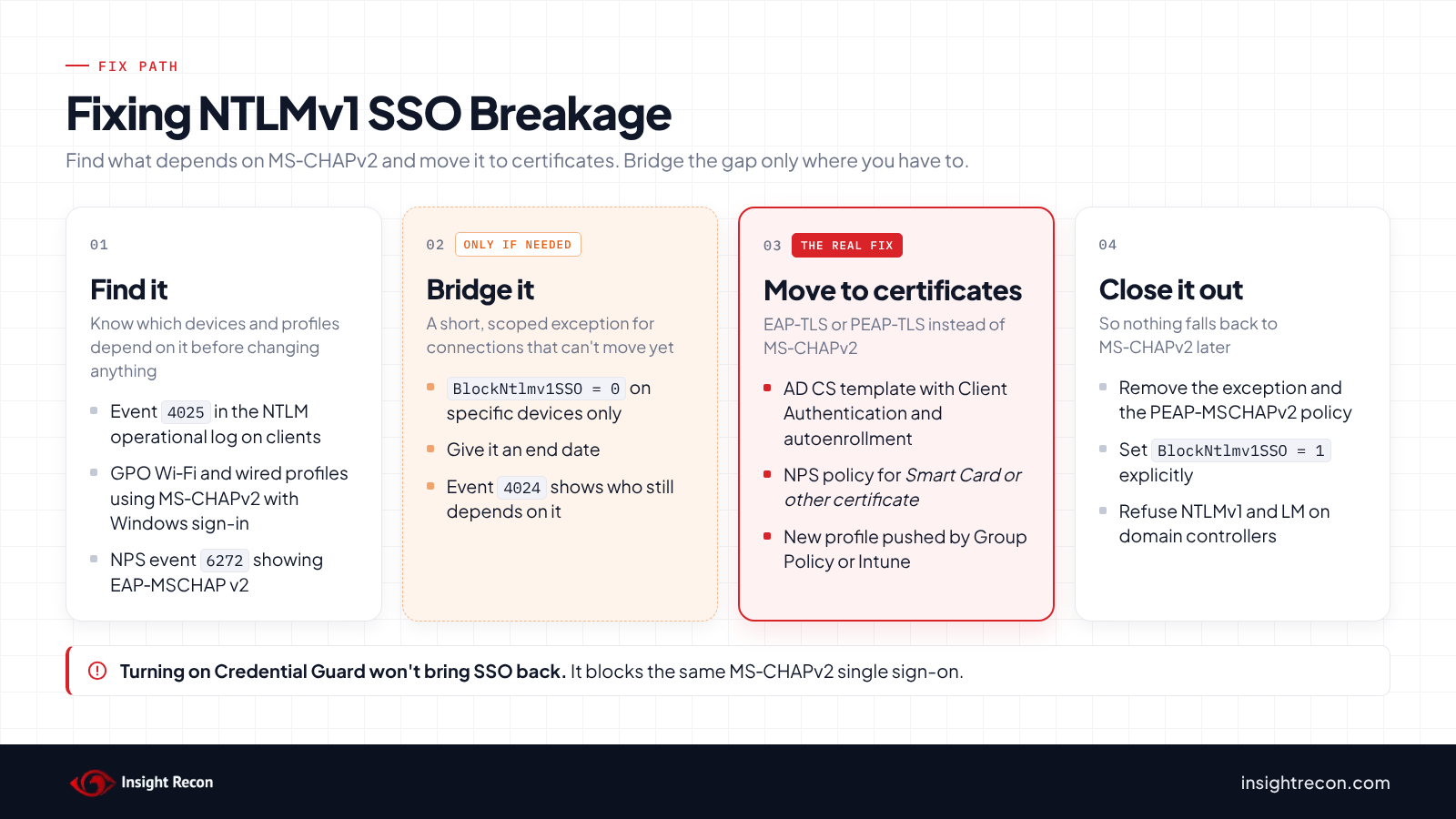
The real fix is to stop using MS-CHAPv2 for network authentication. Microsoft's Credential Guard guidance is to move from PEAP-MSCHAPv2 and EAP-MSCHAPv2 to certificate-based methods such as EAP-TLS or PEAP-TLS. If you already run AD CS, the usual path looks like this:
- Publish a computer certificate template (and a user template if you need user-level policy) with the Client Authentication purpose, and turn on autoenrollment.
- Confirm devices actually have the certificate before changing anything on the network side.
- Add an NPS network policy that allows Microsoft: Smart Card or other certificate next to the existing PEAP-MSCHAPv2 policy, so both work during the move.
- Push a new Wi-Fi or wired profile that uses EAP-TLS through Group Policy or Intune.
- Remove the PEAP-MSCHAPv2 policy once your 6272 events show nothing is using it.
Computer certificates also authenticate before anyone signs in, which helps on shared machines where a user certificate can't be enrolled until the device is already on the network. Phones and personal devices are a separate project. They aren't affected by this change, but moving them off PEAP-MSCHAPv2 means getting certificates onto them through an MDM.
Use BlockNtlmv1SSO as a Temporary Exception
If a connection can't move yet, you can put the devices that depend on it back into audit mode. Microsoft says no restart is needed.
# 0 = audit, 1 = enforce
New-ItemProperty -Path 'HKLM:\SYSTEM\CurrentControlSet\Control\Lsa\MSV1_0' `
    -Name 'BlockNtlmv1SSO' -PropertyType DWord -Value 0 -Force
Deploy it with a Group Policy Preferences registry item and target only the devices that need it, using a security group or item-level targeting. Microsoft describes audit mode as a scoped, temporary security exception, so give it an end date. While it's in place, the 4024 events tell you exactly which devices still depend on it. It has no effect on devices where Credential Guard is running.
Once you've migrated, setting the value to 1 makes enforcement explicit instead of relying on the default.
Prompt for Credentials Instead
Typed credentials still work, so changing a profile to prompt the user gets people connected. In the EAP-MSCHAPv2 settings that means clearing Automatically use my Windows logon name and password, which sets UseWinLogonCredentials to false in the profile. Treat it as a stopgap. Users get prompted, and it's still MS-CHAPv2 underneath.
Retire NTLMv1 on the Domain While You're There
The SSO block is separate from NTLMv1 authentication to your domain controllers, but it's part of the same cleanup. Windows 11 24H2 and Server 2025 no longer include the NTLMv1 protocol, but domain controllers running Windows Server 2022 or earlier can still accept it from older clients and appliances.
- Find it first: on domain controllers, event 4624 shows
NTLM V1in the Package Name (NTLM only) field for NTLMv1 logons. Skip the ANONYMOUS LOGON events, which Microsoft says always show NTLM V1. - Then refuse it: set Network security: LAN Manager authentication level to Send NTLMv2 response only. Refuse LM & NTLM on domain controllers once nothing legitimate shows up.
- Stop storing LM hashes: make sure Network security: Do not store LAN Manager hash value on next password change is enabled.
Finding NTLMv1 Exposure with Insight Recon
Event 4624 shows you who's using NTLMv1 today. Insight Recon's read-only Active Directory security assessment tells you whether your domain still allows it, along with 150+ other checks:
- NTLMv1 or LM is Permitted (High): flags when domain controllers allow NTLMv1 or LM authentication, which gives attackers hashes they can capture and use to impersonate users.
- LM Hash in Use (Moderate): flags use of LM hashes, an outdated format that cracks into clear-text passwords.
Every finding includes the attacker context and the remediation steps. It doesn't read wireless or 802.1X policies, so the Group Policy script earlier in this post is still how you find those.
Find NTLMv1 and LM exposure in your domain. Free, read-only, and it takes a few minutes.
Run a Free AD CheckQuick Validation Checklist
- Have you checked for event 4025 on Windows 11 24H2+ and Server 2025 devices?
- Do you know which Wi-Fi, wired and VPN profiles still use PEAP-MSCHAPv2 or EAP-MSCHAPv2?
- Is every
BlockNtlmv1SSO = 0exception scoped to specific devices with an end date? - Do your domain controllers refuse NTLMv1 and LM authentication?
A no on any of these means MS-CHAPv2 or NTLMv1 is still carrying part of your authentication.
Risk & Compliance Mapping
MS-CHAPv2 gives attackers credential material they can crack and reuse, and this month showed how quickly a change to it can knock users off Wi-Fi and VPN.
| Framework | Reference | Why it applies |
|---|---|---|
| NIST CSF 2.0 | PR.AA-03 | Users, services and hardware are authenticated. MS-CHAPv2 is a weak way to do it. |
| CIS Controls v8 | 4 (Secure Configuration), 12.6 | Secure configuration baselines, and secure network protocols such as 802.1X and WPA2 Enterprise or greater. |
| MITRE ATT&CK | T1557, T1110.002 | Adversary-in-the-middle capture of MS-CHAPv2 exchanges and offline cracking of the result. |
| Microsoft guidance | Credential Guard considerations | Move Wi-Fi and VPN from MS-CHAPv2 to certificate-based authentication. |
Frequently Asked Questions
Will turning on Credential Guard fix this?
No. Credential Guard blocks MS-CHAPv2 single sign-on too, which is why devices with it running were already prompting before the update. It's worth turning on for its own sake, but you still need to move off MS-CHAPv2.
Are iPhones, Android devices and Macs affected?
No. This is a Windows change. Other devices on the same PEAP-MSCHAPv2 network keep working.
Do I need to restart after changing BlockNtlmv1SSO?
No. Microsoft says the change takes effect without a restart.
Is Microsoft turning off NTLM completely?
Not with this change. It only blocks NTLMv1-derived credentials from being used for single sign-on. NTLMv2 still works, although Microsoft is phasing NTLM out over time.
Does this affect Windows 10?
Microsoft's announcement covers Windows 11 24H2, 25H2 and 26H2 and Windows Server 2025 only.
Treat MS-CHAPv2 as Legacy Authentication
MS-CHAPv2 has been a weak spot in a lot of 802.1X and VPN setups for years, and Windows now refuses to use it for single sign-on by default. The audit period is over. Find what still depends on it and move it to certificates, with a short, documented exception only where you have to.
See what else in your AD still allows legacy auth. Insight Recon checks NTLMv1, LM, RC4 and DES along with the rest of your domain. Free and read-only.
Scan Your Domain NowAdditional References
- Microsoft: Upcoming changes to NTLMv1 in Windows 11, version 24H2 and Windows Server 2025
- Microsoft Learn: Credential Guard considerations and known issues
- Microsoft Learn: Configure Credential Guard
- Microsoft Security Advisory 2743314: Unencapsulated MS-CHAP v2 Authentication
- Microsoft Open Specifications: Reading a Wireless or Wired Policy Object from Active Directory
- Microsoft Learn: UseWinLogonCredentials element